Tik Tok Voice Text to Speech: A Complete Guide
Creating engaging TikTok videos is no longer limited to recording your own voice. With modern text-to-speech tools, creators can turn written scripts into natural-sounding narration without using a microphone or recording multiple takes. Whether you make educational videos, product demonstrations, storytelling clips, or short entertainment content, voice technology can make your workflow faster and more flexible.
The term tik tok voice text to speech describes the process of converting written text into spoken audio that can be used in TikTok videos. Instead of recording every sentence manually, you can prepare a script, select a suitable voice, generate the narration, and synchronize it with your visuals. The result can sound polished while saving considerable production time.
However, good text-to-speech content requires more than simply entering words into a generator. Script structure, punctuation, pacing, voice selection, pronunciation, and editing all affect the final result. This guide explains how the technology works, how to create better narration, common mistakes to avoid, and practical ways to make text-to-speech videos feel natural.
What Is Tik Tok Voice Text to Speech?
Tik Tok voice text to speech is a voice-generation approach that transforms written words into spoken narration for TikTok content. The creator provides text, and the software processes the script to produce an audio track.
This can be useful when you do not want to record your own voice, need consistent narration across many videos, or want to produce content quickly. A creator can prepare several scripts in advance and generate voiceovers as part of a repeatable production process.
Text-to-speech is particularly useful for short-form videos because TikTok content often depends on quick delivery and clear communication. A well-written voiceover can introduce a topic, explain a product, tell a story, or guide viewers through a tutorial while supporting the visual elements on screen.
The technology has also improved significantly. Many modern systems can adjust speech patterns, pronunciation, pauses, and emotional delivery, making generated narration much more suitable for social media than older robotic voices.
Why Creators Use Text-to-Speech for TikTok
There are several practical reasons creators choose synthetic narration.
Faster Content Production
Recording voiceovers can take longer than expected. You may need several takes because of mistakes, background noise, pronunciation problems, or inconsistent delivery.
Text-to-speech removes much of that process. Once the script is ready, narration can be generated quickly. This is especially valuable for creators publishing frequently.
Consistent Voice Quality
A creator’s voice can sound different from one recording session to another. Changes in energy, microphone position, room acoustics, or background noise can affect quality.
Using the same generated voice can provide greater consistency between videos. This is useful for channels that want a recognizable narration style.
No Microphone Required
Not everyone has access to a good microphone or a quiet recording environment. Text-to-speech provides an alternative for creators who want voice-based videos without investing heavily in recording equipment.
Easier Script Corrections
If you record a sentence incorrectly, you normally need to record it again. With text-to-speech, you can edit the written sentence and regenerate the narration.
This makes revisions much easier during the editing process.
How TikTok Text-to-Speech Works
The basic process behind tik tok voice text to speech is straightforward.
First, you write the narration. The text is then processed by a speech-generation system that analyzes words, sentence structure, punctuation, and pronunciation. The system converts this information into spoken audio.
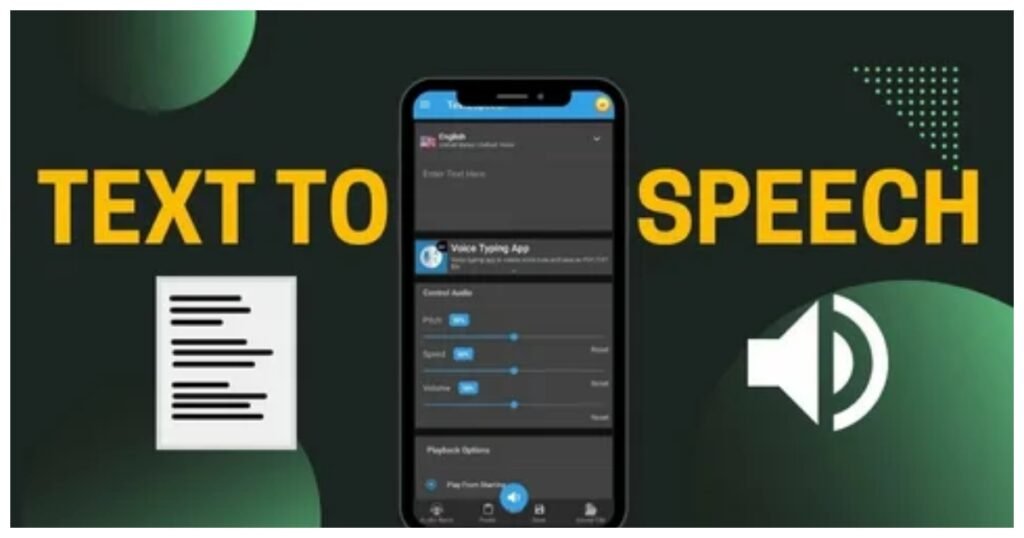
Depending on the tool, you may be able to select different voices, adjust speed, change pitch, or control other aspects of delivery.
The generated audio can then be placed over video footage. During editing, you can synchronize the narration with captions, images, animations, screen recordings, or other visual elements.
The important point is that the quality of the final video depends heavily on the script. Even an excellent voice can sound unnatural if the text is poorly structured.
How to Write a Better Text-to-Speech Script
A text-to-speech voice does not interpret writing exactly like a human speaker. Small changes in punctuation and sentence structure can influence how the narration sounds.
Keep Sentences Short
Long sentences can create awkward pacing. Instead of placing several ideas into one sentence, divide them into smaller sections.
For example:
Here are three simple ways to improve your TikTok videos, starting with better hooks, followed by stronger captions, and finally more focused editing.
This could be divided into:
Want better TikTok videos? Start with your hook. Then improve your captions. Finally, keep your editing focused.
The second version is easier to understand and usually easier for a voice generator to deliver naturally.
Use Punctuation for Pauses
Commas, periods, question marks, and other punctuation can affect speech rhythm.
If narration sounds too fast or flat, review the script and add natural pauses where a human speaker would normally breathe or emphasize an idea.
Write the Way People Speak
Written language and spoken language are not always the same.
A sentence may look professional on paper but sound unnatural when spoken. Use conversational wording when appropriate.
Instead of:
Individuals should consider implementing this strategy to achieve improved results.
Try:
If you want better results, try this strategy.
The second sentence sounds more direct and natural.
Choosing the Right Voice
Voice selection is one of the most important parts of tik tok voice text to speech content.
The best voice depends on your subject and audience.
A technology tutorial may work well with a clear, confident voice. A storytelling video may benefit from a warmer and more expressive delivery. Educational content often works best with a voice that is easy to understand rather than one that sounds overly dramatic.
Match Voice and Content
Think about the personality of your video.
A serious subject may require calm narration, while entertainment content can support a more energetic voice. Product videos may benefit from a confident and persuasive tone.
The goal is not necessarily to find the most realistic voice. The goal is to find a voice that fits the message.
Prioritize Clarity
A voice that sounds impressive but mispronounces important words can damage the quality of your video.
Always listen to the complete narration before publishing. Pay particular attention to names, technical terms, abbreviations, numbers, and unusual words.
Making Text-to-Speech Sound More Natural
One of the biggest challenges with generated narration is avoiding a mechanical feeling.
The following techniques can help.
Add Natural Pauses
Pacing matters. Give important statements enough space to register.
A short pause before a key point can also increase anticipation. Avoid making every sentence run continuously.
Vary Sentence Length
If every sentence has the same structure, narration can become repetitive.
Mix short statements with slightly longer ones. This creates a more natural rhythm.
Use Emphasis Carefully
Some tools allow creators to influence emphasis through punctuation or voice controls. Use these features selectively.
Too much emphasis can make the narrator sound exaggerated.
Edit the Audio
Generated narration does not have to be the final version. You can adjust volume, remove unwanted pauses, synchronize sections with visuals, and combine narration with background music or sound effects.
Good editing can make a significant difference even when the original voice generation is simple.
Using Text-to-Speech With TikTok Captions
Captions are extremely important for short-form videos because many people watch content without sound.
When using tik tok voice text to speech, consider treating narration and captions as two connected parts of the video.
Your captions should generally follow the narration closely, but they do not always need to display every word at once. Breaking the script into readable sections can make the video easier to follow.
Highlighting important phrases can also help viewers understand the main message quickly.
Keep captions large enough to read on a mobile screen and avoid placing important text where TikTok’s interface may cover it.
Creating a Strong TikTok Hook
Voiceover quality cannot rescue a weak opening.
The first few seconds should give viewers a reason to continue watching. Your narration should introduce a problem, question, surprising fact, benefit, or curiosity gap.
For example:
Most people make this mistake when creating TikTok videos.
This creates immediate curiosity.
Another approach is to promise a specific benefit:
Here are three ways to make your videos easier to watch.
The strongest hook depends on your niche, but the principle remains the same: get to the point quickly.
Common Mistakes to Avoid
Many creators use text-to-speech but overlook basic production problems.
Writing Huge Blocks of Text
A long paragraph can create poor pacing and make synchronization difficult. Break scripts into logical sections.
Using an Unrelated Voice
A voice that does not match your content can make the video feel disconnected.
Consider your topic and audience before selecting a voice.
Ignoring Pronunciation
Always check words that may be difficult for a voice system to interpret.
Brand names, foreign words, acronyms, and technical terminology deserve extra attention.
Making Every Video Sound Identical
Consistency is helpful, but repetition can become boring. You can maintain a recognizable voice while changing hooks, pacing, visuals, music, and storytelling structure.
Overusing Effects
Text-to-speech videos do not need excessive transitions or sound effects. Every editing choice should support the message.
Too many effects can distract viewers from the narration.
How to Create a TikTok Video With Text-to-Speech
A simple production workflow can make the process much easier.
Step 1: Choose the Topic
Start with one clear subject. Avoid trying to cover several unrelated ideas in a short video.
Step 2: Write the Hook
Create the opening sentence before writing the rest of the script. The hook should encourage viewers to keep watching.
Step 3: Build the Script
Explain the topic using short, clear sentences. Remove unnecessary words and repetition.
Step 4: Generate the Voice
Enter your script into your chosen text-to-speech system and select a voice that fits the content.
Step 5: Review the Narration
Listen carefully. Check pronunciation, pacing, pauses, and tone.
If something sounds unnatural, revise the text rather than simply accepting the first result.
Step 6: Add Visuals
Match your footage, screenshots, animations, or images with the narration.
The visuals should add information rather than simply fill the screen.
Step 7: Add Captions
Create readable captions that follow the voiceover and emphasize important points.
Step 8: Review the Complete Video
Watch the final version from beginning to end. Check whether the opening is strong, the pacing feels comfortable, and the ending gives viewers a clear takeaway.
Using Tik Tok Voice Text to Speech for Different Content Types
The approach can change depending on the type of content you create.
Educational Videos
Educational creators can use generated narration to explain concepts, summarize information, or provide step-by-step tutorials.
Keep explanations simple and use examples whenever possible.
Product Videos
Product-focused videos can use narration to explain features and benefits. Instead of listing specifications, focus on how the product solves a real problem.
Storytelling
Storytelling requires stronger pacing. Use pauses, short sentences, and carefully selected visuals to maintain attention.
Faceless Content
Text-to-speech is especially useful for faceless channels. Creators can combine narration with screen recordings, stock-style visuals, animations, graphics, or demonstrations.
The voice becomes part of the channel’s identity even though the creator does not appear on camera.
Improving Retention With Better Narration
A major advantage of tik tok voice text to speech is the ability to experiment with different scripts quickly.
You can test several hooks for the same topic and compare which one produces stronger engagement.
Instead of spending hours recording different versions, you can revise the opening text and generate another version.
Focus on three areas:
Clarity: Viewers should understand the message quickly.
Pacing: The narration should move forward without feeling rushed.
Curiosity: Each section should give viewers a reason to continue.
A strong video does not necessarily need a dramatic voice. It needs a useful or interesting message delivered at the right pace.
Is Text-to-Speech Good for TikTok?
Yes, text-to-speech can be effective for TikTok when it is used thoughtfully.
The technology is particularly useful for creators who produce educational, informational, faceless, product-focused, or storytelling content. It can reduce recording time and make content production more scalable.
However, generated narration should support good content rather than replace it. A weak script remains weak regardless of the voice used.
The strongest approach is to combine a useful idea, a compelling hook, clear writing, appropriate narration, readable captions, and engaging visuals.
Future of Text-to-Speech Content
Voice technology continues to become more flexible and expressive. As generated voices improve, creators will have more control over tone, pacing, pronunciation, and delivery.
This does not mean human creativity becomes less important. In fact, better tools make creative decisions more important because producing basic narration becomes easier.
The creators who stand out will likely be those who know how to write strong scripts, understand their audience, and combine narration with effective storytelling.
Conclusion
Text-to-speech has become a practical option for TikTok creators who want faster and more consistent video production. From faceless educational channels to product demonstrations and storytelling videos, generated narration can fit many content formats.
The key to successful tik tok voice text to speech content is not simply choosing a realistic voice. Strong results come from combining natural scripts, appropriate pacing, clear pronunciation, useful visuals, captions, and effective editing.
Start with a strong idea, write for the ear rather than the page, and always listen to the generated narration before publishing. With the right workflow, text-to-speech can become a reliable part of a TikTok content strategy while still keeping the videos engaging and useful for real viewers.